

- cross-posted to:
- apple_enthusiast@lemmy.world
- hackernews
- cross-posted to:
- apple_enthusiast@lemmy.world
- hackernews
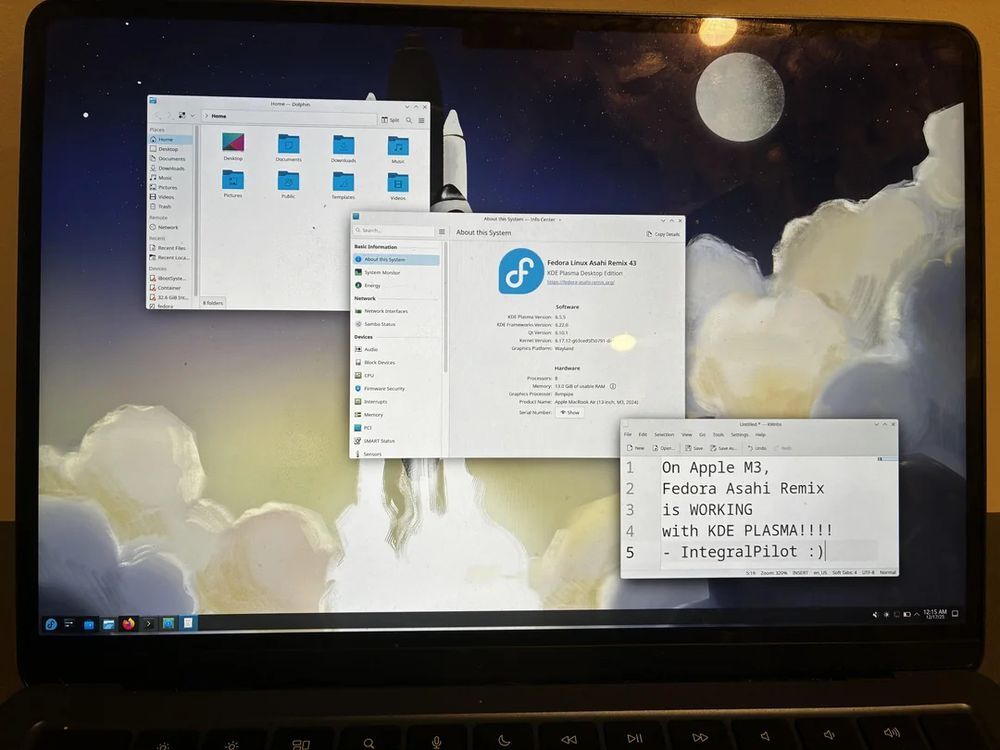
For those who do not know, asahi project until now has only worked on m1 and m2 macbooks till now (newest ones are m5). While I do not remember the technical details as to why it has not worked on m3 yet, here are official pages for support - https://asahilinux.org/fedora/#device-support and more detailed https://asahilinux.org/docs/platform/feature-support/m3/ , but the other day in some thread someone mentioned that the way asahi folks got it working was to load some vms at very early stages of boot, and that way they got stuff working, which was changed (here is link to their comment, though it mentions only m4 being the hard one, so maybe this one is not the correct reason - https://piefed.social/post/1656479#comment_9667816), but more generally, it is because apple is a closed eco system, and thy absolutely do not publish support guides for their socs. So a big achievement.
You must log in or # to comment.
Looking forward for the external monitor support. The fact they have got this far is amazing.
Define “working”.
I’d put money on them referring to definition 2

I wasn’t looking for the actual definition…
Woosh…
barely booting, but that is like one of the hardest step
I’m sure the audience here don’t need this, but just in case a caution to not get one of these things (M1/M2) in order to run asahi. if you get a handmedown or sumsuch, great, have at it, but don’t buy them 2nd hand however great the deal is - and it’s rarely great; for that kind of money you can get a vastly superior thinkpad/elitebook/latitude that you can upgrade RAM and storage and you can service it with a nail clipper.
those things predominantly have only 8 GB and that RAM is shared with graphics. not only is that not enough for any reasonable activity, that config caused the system to use the SSD’s swap excessively; they routinely have insane TBW numbers. that in turn causes the soldered-on SSD chips to give out, netting you a brick. when you add the butterfly-fragile screens that bust from misplaced specks of dust, that purchase is anything but an investment.
I had a coupla folks in my orbit who tried the thing from the 1st paragraph, all like “watch this!” and within a coupla weeks they were back at their thinkpads and pre-T2 macbooks.
Essentially you’d want a M* Pro or Max for the earlier generations as those came with more RAM, but buying one for Asahi support would still be stupid. Buy one if you actually want to use MacOS and then one day when you can no longer get MacOS updates, Asahi might make it useful again.
I also haven’t yet heard of any of these SSDs dying from excessive usage (swap), but I concur that it’s better to not have to swap this much.
The price to performance of this hardware is nowhere near as bad as you imply, it actually beats Intel and AMD based laptops generally. But it only functions properly with MacOS, we’re lucky if we get proper Linux support by the time Apple deprecates them.
TL;DR: They are actually some of the best laptops out there IF you’re willing to use a proprietary OS. They’re not very good if you want to use them for Linux, which I’d imagine is most of this community. Don’t get them if you’d be running Asahi.
literally the first sentence is “don’t get them to run asahi”. wasn’t a dig at apple, macbooks, macOS, etc.
the stuff you’re suggesting (max/pro) is insanely expensive and also not the subject of my comment.
Tbf you went on to claim they’re just generally bad laptops. They’re not. But they’re closed af and that part is bad
one of us lacks reading comprehension. I’m specifically talking about bying used, 5-year old, 8gig laptops, that had excessive SSD wear and are in addition to that expensive and super-fragile.
if you don’t have direct experiences with those things dying en masse, you can visit the site we all hate and their r/macbookrepair subthing and skim over just one week’s worth of posts. then you can click on any of the posts or videos discussing SSDs dying, like this one: https://youtu.be/MZuv4TIjk-I
I went through 2 weeks worth of posts and there was one dead SSD. It was one of the removable ones in a 2TBT3 MBP from 2017.
The ones from your video are also all Intel laptops. Intel Macs ran so freaking hot, I’m surprised they didn’t have more failures of literally every component. The ARM ones are significantly cooler, it’s pretty hard to even get fans running on the Pro models.
There’s issues to be sure and much like you I definitely wouldn’t recommend an used Mac for running Linux, but if you can find a bargain Apple Silicon Mac and both the battery capacity and TBW values aren’t too bad, they’re pretty good, with single core performance right up there with brand new Intel or AMD CPUs in some cases, as well as excellent. Again, only if you’re willing to run a proprietary operating system. For me it’s great for work, but for most personal usage I prefer Linux, running on a desktop.
I mean dude, come on. the ref to mbpr was to illustrate the fragility of the things - did you count the busted screens that aren’t due to drops? the video was to illustrate the problem with soldered on SSDs, how apple got a multitude of different suppliers (and whose quality varies wildly) and how the TBW’s for those devices are incongruent with normal use on other platforms - and those you can simply swap out.
I’m arguing people shouldn’t buy 5-year old 8gig devices for $300+, you’re advocating for $1K+ machines that are marginally better and not even that when you consider the subject of this post, running linux on it. give it a rest already, you’re not proving anything.

