

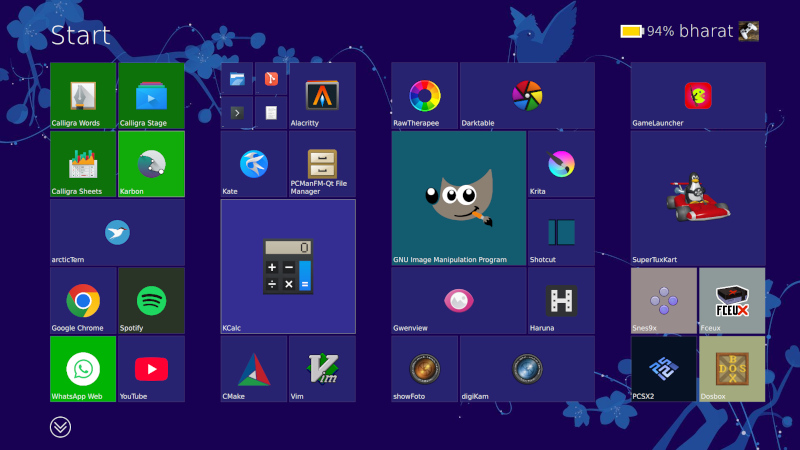
If you were asked to pick the most annoying of the various Microsoft Windows interfaces that have appeared over the years, there’s a reasonable chance that Windows 8’s Metro start screen and interface design language would make it your choice. In 2012 the software company abandoned their tried-and-tested desktop whose roots extended back to Windows 95 in favor of the colorful blocks it had created for its line of music players and mobile phones.
Consumers weren’t impressed and it was quickly shelved in subsequent versions, but should you wish to revisit Metro you can now get the experience on Linux. [er-bharat] has created Win8DE, a shell for Wayland window managers that brings the Metro interface — or something very like it — to the open source operating system.
The most beautiful horror to ever exist lmao
That’s one of the aspects I like from Linux: The ability to make the desktop your own. And, like you, I’ll defend that preference and choice regardless of how terrible it is ;)
Sometimes for no apparent reason I will reconfigure my desktop to look like an old OS (Workbench, MacOS, OS/2, etc…)
100% this.
Every time I try a new distro I spend 1-3 hours messing around with the settings, themes, and widgets to get things exactly the way I want it. This is why Linux rocks.
I am not a developer, but I can only imagine how demotivating it would be if I were to put in the effort to develop a layout I like, share it with other people, and then encounter a post like this.
Most opinionated people hated the Appearance Manager in MacOS, but for me it was a huge highlight of running that OS, with a dear preference towards “Drawing Board”.
There’s a mockup that mocks me as I do really wish this could be done: https://www.pling.com/p/1219916
And then Apple decided to close down any tweaking and convert it into a single look because the great leader wanted uniformity and some brand bs: https://www.wired.com/2002/10/the-mac-os-that-cant-be-tweaked/ - paywall
Workbench? How does one go about doing this, I’d love to feel like I was on an Amiga again lol
e: also is there a way to make my shell look like the commodore 64 blue screen
You will have to submit to XFCE, I have it as a spare when I feel nostalgic from my daily DE (KVM).
Icons are… hard to accomplish:
There are a couple of png libraries out there, so it is possible to recreate either the 3.5 or posterior looks, however the older workbench with its lovely drawers and different sized icons is something I haven’t achieved.
You can still pick a modern DE, add png icons to the desktop and recreate something like this without the filesystem navigation (or prefs):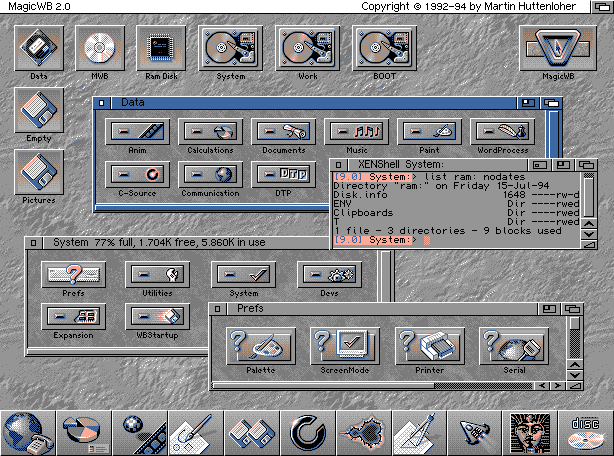
(I found interesting the lower bar with the nextstep-like icons, though this was on 1994 so…)
AmigaOS is still available and able to run all your Linux favourite applications as well as ‘classic Amiga software’, except of course it requires you to be running a PPC processor. Plus it costs money. So you’d have to invest £lots in ‘most of a new PC’ to see whether it even works for you.
Now, if we could open-source it and get it running on x64, I’d love to be running workbench again. It was ahead of its time.
https://amigaos.net/
Or you could just chuck AROS on a bootable thumbdrive.
I have my old Amiga hard drive image with Workbench 3.9, and sometimes start it up in an emulator … it doesn’t take me long to remember that guis have come a long way since the Amiga was relevant :-/